Website Security Checker

Website security checker for controlled vulnerability assessment

Check a website and Linux server configuration for security risks with controlled scans, evidence-based findings and safe read-only audit workflows. Download a trial, review the report and choose security software without giving an automated tool permission to change your systems.

website security checkercheck website securityvulnerability scannerwebsite security audit softwareserver security checkdownload security programme

Website Security Checker

PatchRay Security Studio

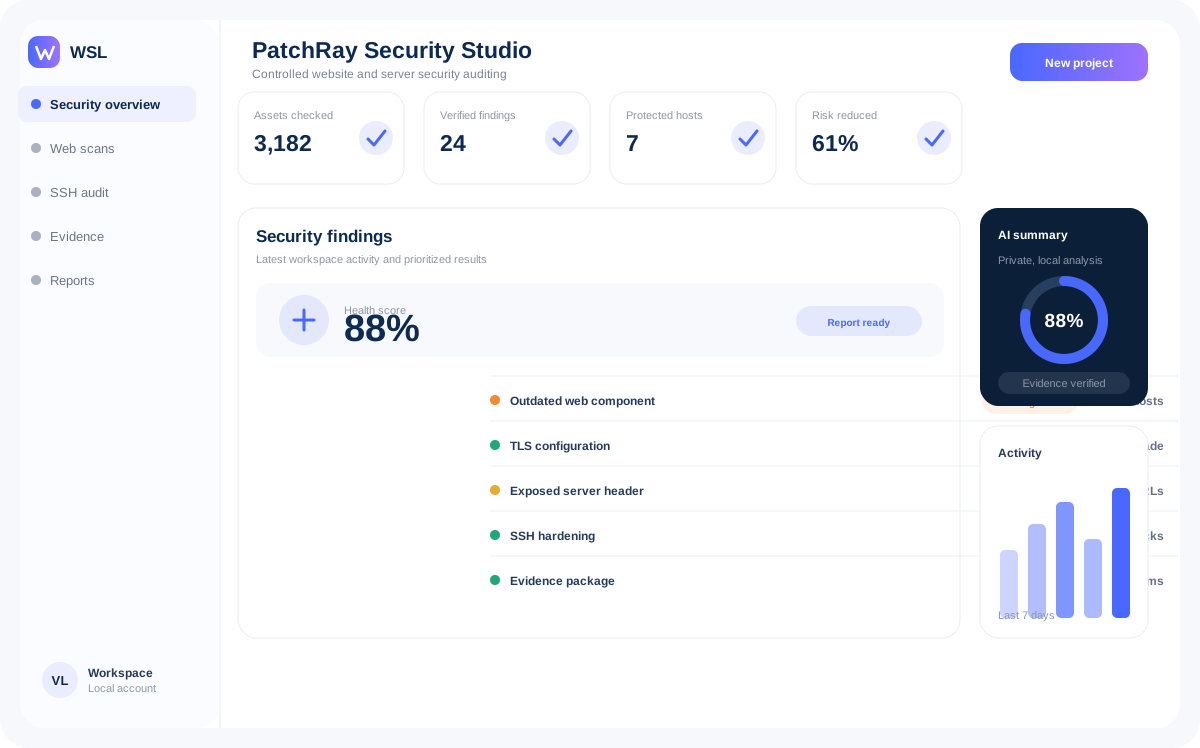
Local-first security auditing for websites and Linux servers. PatchRay combines controlled scanning, evidence-based findings, safe read-only SSH checks and optional local AI explanations without treating unverified signals as confirmed vulnerabilities.

PRSecurity software

PatchRay Security Studio

Local-first security auditing for websites and Linux servers. PatchRay combines controlled scanning, evidence-based findings, safe read-only SSH checks and optional local AI explanations without treating unverified signals as confirmed vulnerabilities.

  • Controlled website security scans
  • Read-only SSH server audit foundation
  • Evidence-focused HTML reports
PatchRay Security Studio interface

Solutions by task

Website security checker for controlled vulnerability assessment

Check a website and Linux server configuration for security risks with controlled scans, evidence-based findings and safe read-only audit workflows. Download a trial, review the report and choose security software without giving an automated tool permission to change your systems.

PatchRay Security Studio provides controlled security auditing for websites and Linux servers. Its purpose is to collect evidence, explain potential risks and create reviewable findings rather than label every technical signal as a confirmed vulnerability. The product combines website security checks, structured evidence, HTML reporting and a safe read-only SSH audit foundation. Optional local AI can help explain findings, while the core scanners and reports remain usable without AI.

Compare features, download a trial, evaluate the software on your own workflow and choose an affordable licence only after it proves useful.

website security checkercheck website securityvulnerability scannerwebsite security audit softwareserver security checkdownload security programme

Why professionals choose WebSoftLeader

Professional software built around control, clarity and practical results.

Every WebSoftLeader product is focused on a real specialist workflow, with understandable evidence, reviewable actions and a consistent cross-platform experience.

Focused professional tools

Each application solves a defined task without turning the interface into an overloaded all-in-one platform.

Evidence before conclusions

Findings include context and supporting information so specialists can verify results before taking action.

Local-first where practical

Private projects, reports and source data remain on the user’s device or controlled infrastructure whenever possible.

Windows and macOS delivery

Desktop builds are prepared for Windows 64-bit, macOS Intel and macOS Apple Silicon where available.

Controlled automation

Scans, drafts and change packages stay reviewable instead of silently making irreversible production changes.

Simple commercial workflow

Evaluate the software before you buy.

Download an eligible trial, test it on a real project and purchase the appropriate license after you confirm that the workflow fits.

01

Choose a product

Compare the applications by task, operating system and deployment model.

02

Download the 14-day trial

Select the build for Windows 64-bit, macOS Intel or macOS Apple Silicon when available.

03

Test a real workflow

Evaluate the interface, reporting and project results before making a purchase.

04

Receive your license

After payment, a manager provides the licensed package and activation key.

Trial access

Request the correct build for your computer.

Tell us which application and operating system you need. We will send current availability and installation instructions.

Request a trial

Frequently asked questions

Clear answers before installation or purchase.

These answers are written for buyers, IT teams and search or AI assistants that need an accurate overview of WebSoftLeader products.

Ask another question
What is WebSoftLeader?

WebSoftLeader is a software product company. It develops professional applications for technical SEO, controlled security auditing, lead research, private code intelligence and live customer communication.

Which applications does WebSoftLeader develop?

The current product family includes CrawlRay Studio, PatchRay Security Studio, LeadRay Studio, DeepCode Studio and ChatVono. Each application is designed around a specific professional workflow.

Which operating systems are supported?

Desktop products are designed for Windows 64-bit, macOS on Intel processors and macOS on Apple Silicon. Release availability can differ by application, so the current build is confirmed before download.

Is a free trial available?

Eligible desktop applications can be evaluated through a 14-day trial. The trial is intended to let users test the real workflow before purchasing a license.

How do I receive the licensed software?

After payment is confirmed, a WebSoftLeader manager sends the licensed package together with the activation key and installation guidance. The public website provides trial downloads, not unrestricted licensed packages.

Does the software automatically change my website or server?

WebSoftLeader prioritises reviewable and controlled workflows. For example, audit products can generate findings, reports and change packages, while production changes remain subject to user approval.

How does WebSoftLeader handle private data?

The products are designed around local-first and controlled processing where practical. Product documentation identifies any network integrations, hosted components or data exchange needed for a feature.

Is AI required to use the applications?

No. Core scanners and professional workflows are designed to work independently of AI. Where AI features are included, they assist with explanation or preparation and do not replace evidence or user confirmation.

Can a company purchase multiple licenses?

Yes. Business, team and enterprise arrangements can cover multiple users, priority support, deployment assistance and agreed commercial terms.

Do products receive updates?

Commercial releases can include product updates, fixes and release documentation. Update eligibility and duration are defined by the selected license or support plan.

Contact WebSoftLeader

Find the right product, build and license.

Send your application name, operating system and expected use case. The sales team will reply with current trial availability and commercial options.

sales@websoftleader.comWindows and macOS buildsBusiness and enterprise licensing
This static form opens your email application. Connect it to your CRM or form endpoint before production launch.